
A strong website rarely succeeds because of individual pages alone. What usually separates high-performing sites from stagnant ones is how well their content connects beneath the surface.
That’s where the internal link becomes a foundational SEO asset.
Search engines use internal links to understand relationships between pages, discover important content, and evaluate site structure. Readers rely on them to navigate naturally, explore related topics, and stay engaged longer.
When internal linking is handled strategically, it quietly improves rankings, crawlability, authority distribution, and user retention — without requiring new content every week.
What Is an Internal Link?
An internal link is a hyperlink that points from one page on a website to another page on the same domain.
Examples include:
- Blog posts linking to related articles
- Product pages linking to category pages
- Navigation menus
- Breadcrumb links
- Footer links
- Contextual links inside content
For example:
- A page about technical SEO linking to a guide on crawl budget
- A fitness blog linking from a “protein intake” article to a “meal planning” article
These links help users and search engines move through your website logically.
Why Internal Linking Matters for SEO
Many websites focus heavily on backlinks while underestimating the power of internal structure.
That’s a costly mistake.
A thoughtful internal linking SEO strategy helps search engines:
- Discover new pages faster
- Understand content hierarchy
- Identify topical relevance
- Pass authority between pages
- Prioritize important URLs
At the same time, users benefit from smoother navigation and deeper exploration.
Internal Link vs External Link
People often confuse internal and external linking, but they serve different purposes.
| Link Type | Purpose | Destination |
|---|---|---|
| Internal Link | Connects pages within the same website | Same domain |
| External Link | Connects to another website | Different domain |
An internal external link strategy works best when both are balanced correctly.
Internal Links Help With:
- Site architecture
- Topic clustering
- User flow
- SEO authority distribution
External Links Help With:
- Credibility
- Source validation
- Trust signals
- Contextual relevance
The best-performing websites use both intelligently.
Types of Internal Linking
Understanding the types of internal linking helps create a more scalable SEO structure.
1. Contextual Internal Links
These are links placed naturally inside content.
Example:
A paragraph discussing keyword research links to a deeper guide about search intent.
This is usually the most valuable internal link type because it provides contextual relevance.
2. Navigational Links
Found in:
- Menus
- Headers
- Sidebars
- Footers
These help users access major site sections quickly.
3. Breadcrumb Links
Breadcrumbs show page hierarchy.
Example:
Home → SEO → Technical SEO → Internal Linking
They improve usability and reinforce site structure for search engines.
4. Related Post Links
Often displayed at the end of articles.
These help reduce bounce rates and extend session duration.
5. Image Links
Clickable images that direct users to related pages or products.
Useful in ecommerce and portfolio websites.
How Internal Linking Builds Topical Authority
Search engines increasingly evaluate websites based on topical depth instead of isolated keywords.
Internal linking helps create semantic relationships between pages.
For example:
A digital marketing website may connect:
- SEO basics
- Technical SEO
- On-page SEO
- Keyword research
- Content optimization
- Link building
This interconnected structure signals subject expertise.
Over time, Google begins associating the site with a broader topical ecosystem rather than single keywords.
That’s why modern SEO relies heavily on strategic content clusters supported by strong internal links.
Best Practices for Internal Linking SEO
Use Descriptive Anchor Text
Avoid vague phrases like:
- Click here
- Read more
- Learn this
Instead, use descriptive anchor text that reflects the destination page.
Good example:
“advanced keyword clustering strategy”
This improves clarity for both users and search engines.
Prioritize Relevance Over Volume
Adding dozens of links to every article weakens usability.
A smaller number of highly relevant links usually performs better.
The goal is guidance, not clutter.
Link to Important Pages More Often
Pages receiving more internal links are generally interpreted as more important.
Strategically direct authority toward:
- Commercial pages
- Pillar content
- High-conversion articles
- Evergreen resources
Avoid Orphan Pages
An orphan page has no internal links pointing toward it.
These pages are difficult for users and crawlers to discover.
Every valuable page should be connected somewhere within the site structure.
Maintain Logical Site Architecture
Good internal linking mirrors clear organization.
A healthy structure usually looks like this:
Homepage
→ Category Pages
→ Subcategories
→ Individual Content Pages
This hierarchy improves crawl efficiency and usability.
Common Internal Linking Mistakes
Even experienced website owners make structural linking errors.
Over-Optimized Anchor Text
Repeating the exact keyword excessively can appear manipulative.
Use natural variations instead.
Excessive Linking
Too many links dilute authority and overwhelm readers.
Quality matters more than quantity.
Broken Internal Links
Broken links create poor user experiences and waste crawl resources.
Regular audits are essential.
Ignoring Older Content
Older articles often contain strong authority.
Updating them with new internal links can revive rankings and traffic.
Internal Link and User Experience
SEO benefits are important, but internal linking also directly impacts user behavior.
Well-placed links:
- Increase time on site
- Improve page depth
- Reduce bounce rates
- Help users discover solutions faster
A visitor who lands on one useful page should naturally find the next relevant page without friction.
That flow creates trust.
Building an Effective Internal Linking Framework
Instead of randomly adding links during publishing, create a structured system.
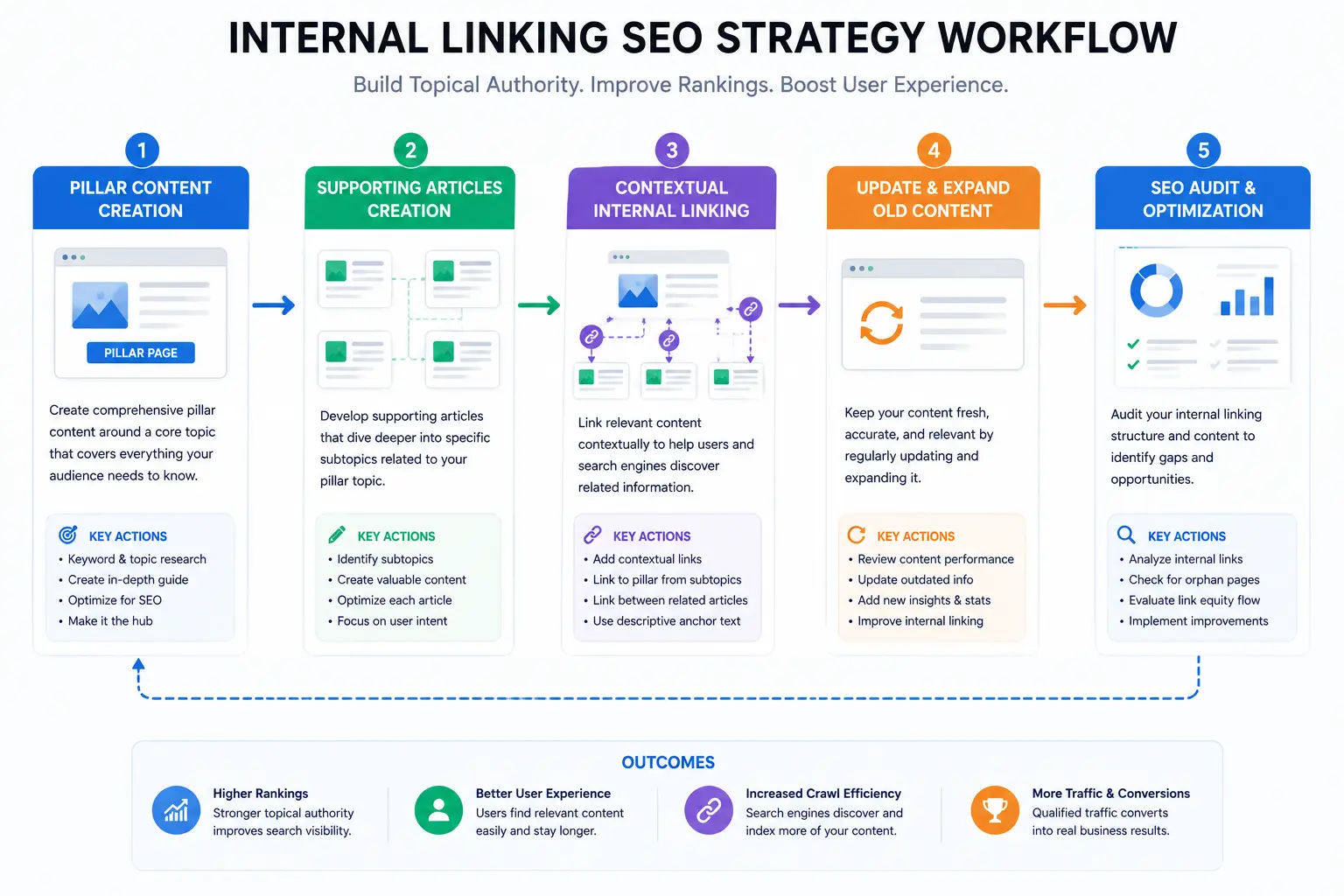
Recommended Workflow
Step 1: Identify Pillar Pages
These are broad, authoritative resources.
Step 2: Build Supporting Content
Create related articles around subtopics.
Step 3: Interlink Contextually
Connect related pages naturally.
Step 4: Update Older Articles
Add links to newer relevant pages.
Step 5: Audit Regularly
Monitor:
- Broken links
- Orphan pages
- Anchor text diversity
- Crawl depth
Consistency matters more than perfection.
Internal Link Optimization for Large Websites
As websites grow, manual linking becomes harder.
Large sites often use:
- Content hubs
- Topic clusters
- Automated related-post systems
- Taxonomy structures
- Smart breadcrumb systems
However, automation should still preserve contextual relevance.
Random auto-linking can reduce quality quickly.
The Relationship Between Internal Link and Crawl Budget
Search engines allocate limited crawl resources to each website.
Internal links help crawlers:
- Discover pages efficiently
- Understand priority
- Revisit updated content faster
Poor linking structures can bury valuable pages several clicks deep.
A strong architecture keeps important content accessible.
Internal Link and External Link Balance
A healthy SEO strategy includes both internal link and external link optimization.
Internal links strengthen your own ecosystem.
External links provide validation and context.
Together, they create:
- Better authority signals
- Improved user trust
- Stronger topical relevance
- More natural content structures
Neither should exist in isolation.
Final Thoughts
An effective internal link strategy is less about adding more hyperlinks and more about creating intelligent pathways through your content.
When pages connect logically:
- users navigate more naturally,
- search engines understand your expertise more clearly,
- and your website becomes structurally stronger over time.
Many SEO gains happen quietly through architecture rather than visible changes.
Internal linking is one of those systems.
And unlike many SEO tactics, it remains valuable regardless of algorithm trends.
FAQs:
How many internal links should a page have?
There is no fixed number. The ideal amount depends on content length, relevance, and usability. Focus on meaningful connections instead of quantity.
Do internal links improve rankings?
Yes. Internal links help search engines understand site structure, distribute authority, and discover important pages more efficiently.
What is the difference between internal and external links?
Internal links connect pages within the same website, while external links point to pages on other domains.
Are contextual internal links better than navigation links?
Contextual links are generally stronger for SEO because they provide topical relevance within content.
Can too many internal links hurt SEO?
Yes. Excessive linking can dilute authority, confuse users, and reduce content clarity.
What are orphan pages?
Orphan pages are pages with no internal links pointing to them, making them difficult for users and search engines to find.
Summary:
Internal linking is one of the most overlooked yet powerful SEO strategies. A well-structured internal link framework improves crawlability, strengthens topical authority, enhances user navigation, and distributes ranking power across a website. Combining smart internal linking SEO practices with balanced external linking creates a stronger, more scalable content ecosystem.